
Building a cloud security roadmap: Tools by layer and when you need them (pt.2)
Understanding the key security tools at each layer of the cloud and what matters most for your organization’s maturity
TL;DR
This post covers:
Quick rundown of each cloud layer, from control plane to application, with a focus on the platform and application layers
What kinds of security tools fit where, when you’ll need them, and vendor examples
A practical roadmap to help you prioritize tools as your org matures
Cloud infrastructure's dynamic, layered architecture creates abundant attack vectors while complicating defensive efforts. Adversaries target vulnerabilities across the entire stack—management planes, orchestration systems, running workloads, and deployed applications. Attack methods range from service misconfigurations and API exploits to malware deployments and insider threats. Compromise indicators vary just as widely across these diverse attack patterns. Effective cloud protection requires detection and response capabilities that address this complete range of security incidents.
This blog series will explore cloud security in depth. We’ll discuss the layers to protect and define the tools available for each. In pt. 1, we explored the Cloud Infrastructure and Orchestration Layers. In pt. 2, we’ll explore the Platform and Application layers, as well as offer a roadmap to reduce cloud security risks.
Refresher of layers of cloud infrastructure
We revisit our restaurant kitchen analogy from pt.1. Each layer plays a different role in preparing the meals—or business applications—you provide to customers, your end users.
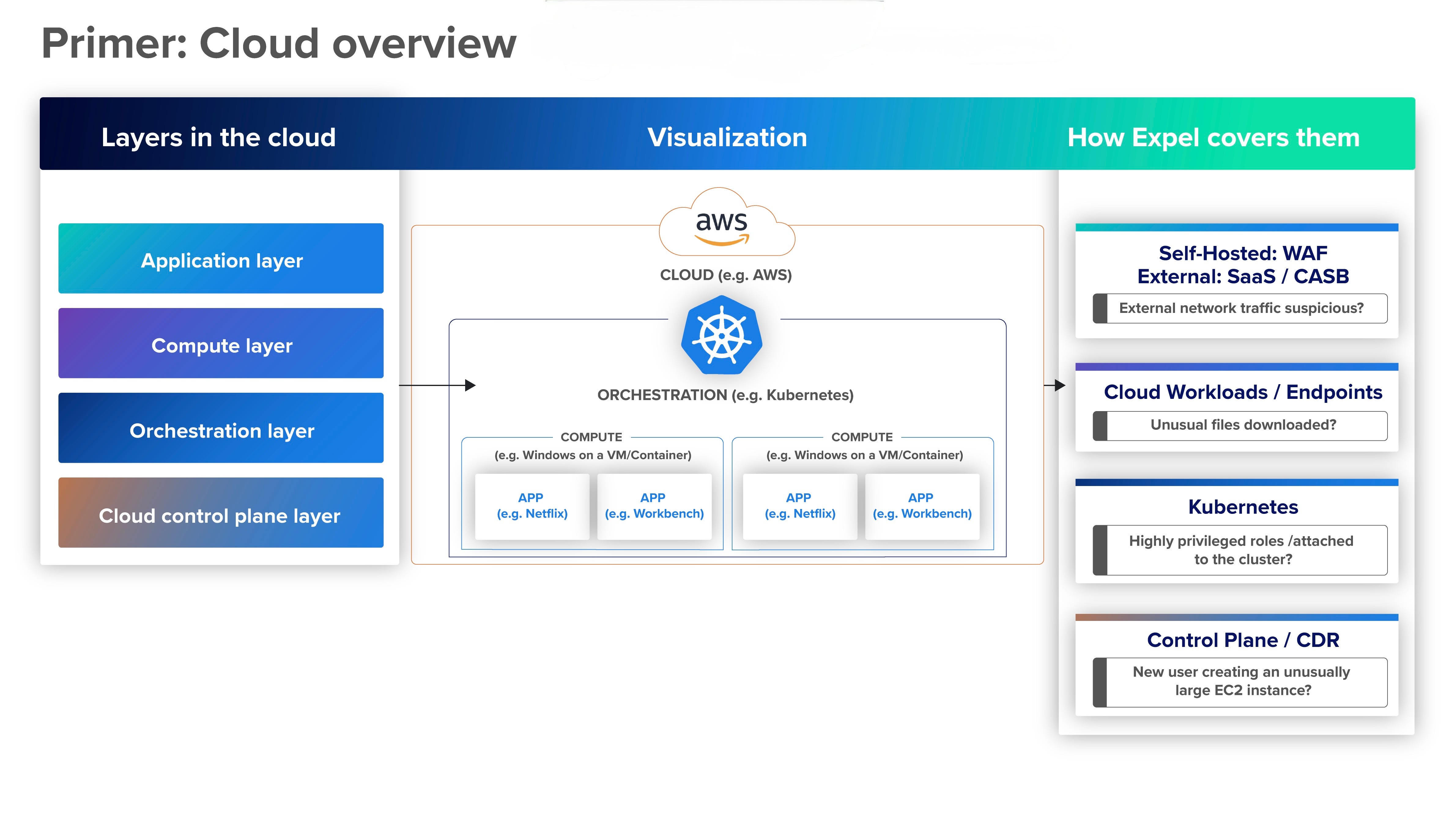
Cloud infrastructure layer (aka the control plane)
You can think of the control plane as the executive chef who oversees the entire kitchen and its operations. When planning for each week’s business, the control plane ensures the kitchen has all the needed cooking tools, ingredients, and staff (or compute, storage, and networking). With the kitchen layout set (or, the environment configured) for optimal quality, efficiency, and safety, the control plane oversees resource allocation to keep things running efficiently. In high-demand periods—like the dinner rush (or, a spike in end-user activity)—the control plane makes high-level decisions about what to prioritize and how to adjust.
Orchestration layer
The orchestration layer is like a sous chef who coordinates food prep for each meal service. It assigns tasks to chefs, makes sure ingredients are prepped at the right time, and manages the order flow from the dining room to the kitchen. If there’s a dinner special, the sous can reassign line cook tasks—or scale and move cloud-native applications across the environment to support changing requirements.
Platform layer
In our kitchen analogy, the platform layer corresponds to the line cooks preparing dishes. Each cook has all the equipment they need to perform assigned tasks, such as knives, cookware, and appliances (or, frameworks and runtime environments). In the simplest terms, the platform layer gets you from a cold kitchen full of raw ingredients to a piping-hot meal ready to eat.
Application layer
In a restaurant, these applications are the meals that emerge from the kitchen and land on patrons’ tables. These customers don’t need to know what happens in the kitchen—how its operations are managed, where the raw ingredients are stored, or what the line cooks do. They just consume the final product.
Read (pt. 1) for more detailed descriptions.
From CNAPP to KSPM: demystifying acronyms at every layer
We revisit our demystification of the whole alphabet soup of tools is, this time focusing on Platform and App layers. Read (pt. 1) for more detailed descriptions on the Cloud and Orchestration layers.

Platform layer
Attackers target the platform layer to access both the workloads it runs and the orchestration-layer services it connects with. Security teams need tools that can help them close vulnerabilities before they can be exploited—and detect any threats that do slip through.
Cloud workload protection platform (CWPP)
Continuing our analogies to the security tools already discussed, CWPP is similar to CDR. It performs some of the same functions as a vulnerability scanning tool, but focuses specifically on containers and VMs. Its role includes:
Continuous monitoring and threat detection for cloud workloads, including VMs, containers, and serverless functions.
Automated vulnerability assessments, configuration checks, and malware scanning to identify and prioritize security risks within containers.
Automated responses to neutralize threats.
Example use case:
A healthcare organization runs workloads for containerized clinical applications at the platform layer of its cloud infrastructure.
Attackers exploit a misconfigured container to inject malware into its memory.
The malware attempts to exfiltrate sensitive patient data and spread laterally to other containers in the cluster.
The company’s CWPP detects unusual API calls and unauthorized processes in the container.
Recognizing this as malicious behavior, the tool isolates the container by restricting its network access and stopping its execution.
To prevent future attacks from exploiting the same vulnerability, the CWPP scans the container images used in the environment to identify any unpatched libraries or dependencies. It then provides recommendations for rebuilding and updating secure images across the cluster.
Examples of CWPP tools include Prisma Cloud Compute, Orca Security, Aqua, and Sysdig, Armo, and Raven.
Vulnerability scanning and assessment
Vulnerability management (aka VM, but we’ll spell it out here to avoid confusion with virtual machines) is a foundational security function for every organization. We explore this topic in greater depth in our blog post on vulnerability management for cloud environments.
At a high level, vulnerability management is the continuous process of identifying, assessing, prioritizing, and remediating security gaps before they can be exploited. These weaknesses can include misconfigurations, unpatched software, insecure APIs and protocols, and other potential vulnerabilities.
In contrast to CPSM—which focuses on cloud configuration risks—vulnerability scanning identifies weaknesses on application hosts, as well as some risks within applications themselves.
Example use case:
A large university’s cloud environment has grown and evolved rapidly, raising concerns that vulnerabilities have also proliferated.
The university’s IT team uses a VM tool to conduct a thorough scan of its compute instances, container images, and APIs for known vulnerabilities.
The assessment turns up an unpatched operating system on a virtual machine, outdated libraries in a container image, and a vulnerability in an exposed API.
The tool’s dashboard provides a complete list of detected vulnerabilities ranked by severity, with the API at the top. It could easily be exploited for access to sensitive data.
Remediation guidance helps the team mitigate the most important risks and improve compliance with regulatory data security requirements.
Examples of vulnerability scanning and assessment tools include: Qualys, Rapid7, and Tenable.
Application layer
Security tools at the application layer focus on protecting cloud-based applications throughout their lifecycles. This includes securing applications in production, their data, and the way users and services interact with them, as well as safeguarding the DevOps pipeline and its resources.
First, we’ll explore tools focusing on applications in production.
Application detection and response (ADR)
ADR follows a familiar pattern: It serves a similar purpose to CDR and KDR, but for applications. An ADR platform provides continuous monitoring and threat detection across cloud-based applications, services, and their interactions. Security teams gain visibility into runtime activities that can signal hidden threats that bypass other security measures. Automated threat investigation, validation, and remediation processes support a fast response to mitigate risk and prevent damaging attacks.
Example use case:
A home services provider interacts with customers using a cloud-native application, which handles sensitive data such as payment information and personal customer details.
An attacker uses an access control vulnerability to access unauthorized data and escalate privileges for additional services.
The company’s ADR detects unusual patterns in the application’s runtime behavior, including making unauthorized API calls to access restricted data.
The tool traces the calls to an endpoint with an IAM misconfiguration.
To stop the attack, the ADR terminates the malicious session and quarantines the compromised microservice until the security team can fix it.
Examples of ADRs include Miggo, Oligo, Upwind, and Sweet Security.
Runtime application self-protection (RASP)
RASP is an application security technology that developers integrate directly into their code during development or deployment. RASP plays a similar role to ADR—detecting and blocking application-layer attacks. But they operate very differently:
While ADR monitors interactions between applications, APIs, and the broader cloud environment, RASP focuses more narrowly on the runtime of individual applications or serverless functions.
Like ADR, RASP uses behavioral analysis to detect threats based on their activity. Unlike ADR, RASP doesn’t look for static vulnerabilities or predefined signatures.
ADR excels at detecting complex attack patterns across the environment, such as lateral movement or API abuse. RASP is ideal for protecting specific applications or functions from runtime exploits like injection attacks or zero-day threats.
Example use case:
A travel agency runs serverless functions to process customer payments.
Due to a coding error, one of these functions is vulnerable to a command injection attack.
During runtime, an attacker tries to take advantage of this flaw—specifically, by injecting shell commands through user input fields—to exfiltrate customer payment data.
The company’s developers have embedded RASP into the function. The RASP detects this unusual input pattern and immediately blocks the attack by rejecting the request.
RASPs have fallen out of favor given their performance impact to the underlying application.
Examples of RASP solutions include Imperva, Contrast Protect, and Aikido Security Platform.
API security
API security tools complement ADR and RASP by addressing API-specific threats that can let attackers compromise or move between applications or containers. API monitoring includes:
Continuously tracking API usage patterns such as request rates, response times, and data access behaviors.
Detecting suspicious activity—such as unauthorized access attempts or unusual usage patterns—that can indicate API abuse.
Mitigating attempted attacks through real-time measures such as:
Refusing requests.
Imposing rate limiting.
Blocking IP addresses.
Revoking compromised API keys.
Identifying misconfigurations or other vulnerabilities in API endpoints that attackers could exploit.
Discovering overlooked shadow or zombie APIs that pose unnecessary security risks.
Example use case:
An e-commerce company runs cloud-native applications that rely heavily on APIs to manage customer orders, process payments, and update its inventory.
One day, an attacker uses a compromised API key to access sensitive customer data through an exposed API endpoint.
They make repeated, unauthorized API requests to exfiltrate large amounts of this data.
The API monitor detects the unusual spike in API requests from an unfamiliar IP address.
It flags this behavior as unusual and triggers the safeguards described above.
A log of API activity during the incident includes timestamps, endpoints accessed, payloads sent, and user-agent details.
Based on these insights, the team implements stricter controls to prevent similar attacks.
Examples of API security tools include Aikido, Salt Security, Cloudflare, and F5.
Cloud access security broker (CASB)
A CASB sits between SaaS apps and their users to enable secure access and monitor user behavior, data interactions, and application usage—and identify and isolate threats. More specifically, a CASB:
Uses APIs to monitor and analyze user behavior for anomalies such as unusual login locations or excessive data downloads.
Applies data security measures such as encryption, tokenization, and data loss prevention (DLP) to protect data traveling across cloud services.
Identifies unauthorized cloud usage, such as unsanctioned SaaS applications, accessed by employees.
Supports compliance by continuously assessing and reporting on cloud security posture.
Example use case:
An employee at a global consulting firm accidentally uploads a strategic client document to a public folder in Google Drive. The CASB:
Identifies the use of a public folder as unusual.
Analyzes the document’s content to assess its sensitivity.
Flags it as risky.
Takes action to mitigate this risk.
The CASB’s automated response includes:
Removing public access permissions on the file.
Notifying the employee and the company’s security team of the incident.
Maintaining an audit trail for the incident to ensure compliance.
Examples of CASBs include Netskope and Zscaler.
Web application firewall (WAF)
A WAF is a standard element of every cloud security toolset. It acts as a security checkpoint between an organization’s web services and the public internet. It monitors and protects HTTP traffic to and from web applications, analyzes incoming requests, and filters or blocks any harmful activities it detects. This includes:
Protecting web applications and APIs against threats like SQL injection, cross-site scripting (XSS), and remote code execution.
Applying SSL/TLS encryption to protect data in transit from theft and man-in-the-middle attacks.
Using bot management techniques and attachment scanning to combat spam-borne malware and phishing threats.
Defending against DDoS by detecting abnormal traffic patterns and mitigating potential attacks.
Example use case:
An e-commerce company uses a website to handle customer transactions and store their saved payment information.
Attackers attempt to exploit an SQL injection vulnerability in the site’s search tool to gain access to this database.
Using predefined rules, the WAF:
Detects the SQL commands in these input parameters.
Recognizes the likely attack.
Blocks the request.
Alerts the security team for further investigation and follow-up
Examples of WAFs include Check Point, Cisco, Fortinet, and CloudFlare, as well as those provided by major cloud service providers.
SaaS security posture management (SSPM)
SSPM, like other members of the xSPM family—CSPM and KSPM—provides continuous monitoring to identify misconfigurations, excessive privileges, and suspicious behavior for SaaS applications. Organizations can use SSPMs to implement IAM controls, manage SaaS-to-SaaS connections, and ensure the security of integrations between different cloud services. When it detects vulnerabilities, the SSPM can often remediate them automatically or provide guidance for human remediation.
Example use case:
An agency uses SaaS applications like Google Workspace and Slack for communication and collaboration.
Over time, misconfigurations have accumulated—publicly shared files, overly permissive user roles, disabled MFA, and so on—exposing the NGO to potential data breaches and compliance violations.
Following a security incident, the NGO implements an SSPM to improve its risk profile.
The tool:
Scans its SaaS applications for misconfigurations.
Evaluates their severity based on organizational policies and regulatory requirements, as well as the specific data and systems involved.
Prioritizes remediation accordingly.
Moving forward, the SSPM flags such vulnerabilities as they arise, helping the NGO maintain its improved security posture.
Examples of SSPM tools include Adaptive Shield, and AppOmni.
Secure access service edge (SASE)
A type of cloud-native architecture rather than a tool, per se, SASE integrates networking and security services into a unified platform. By adopting SASE, organizations can achieve more-consistent and comprehensive security across users, devices, and applications while giving security teams a single point of management and visibility. SASE typically encompasses security functions that include:
Protecting cloud applications by monitoring and controlling access, enforcing data security policies, and detecting and mitigating threats.
Inspecting web traffic to detect malware, filter phishing attacks, and block access to malicious websites.
Securing network traffic across users and locations.
Monitoring data flows to prevent unauthorized sharing or exposure.
Example use case:
A global tech company with a hybrid workforce faces challenges securing the many different scenarios where its employees work—home offices, branch locations, public Wi-Fi networks, and so on.
A SASE makes it easier for the company to provide secure connectivity to corporate resources through a variety of access points while maintaining consistent security policies and threat protection.
DevSecOps team tools
The tools above focus on securing the applications an organization uses. But in the DevSecOps age, security begins well before developers deliver code to production. DevSecOps teams use their own sets of tools and methods to help prevent vulnerabilities from entering the cloud environment and reduce the risk posed by an attack.
DevSecOps tools include software composition analysis (SCA), code scanning, infrastructure-as-code (IaC) scanning, software bill of materials (SBOM), scanning in the integrated development environment (IDE), pre-commit scanning, registry and repository security, and pipeline security.
Software composition analysis (SCA)
An organization’s application code base typically includes both third-party code, such as open-source projects and packaged software, and internally developed custom code. SCA tools help DevSecOps teams prevent third-party code from introducing weaknesses into their security posture.
Embedded into the continuous integration/continuous delivery (CI/CD) pipeline, an SCA can detect vulnerabilities and compliance violations, including exposed secrets, in externally developed code and offer remediation suggestions. This “shift-left” approach can prevent security flaws from reaching production without the delays and costs of later-stage testing and remediation.
Another key SCA function is to generate software bills of materials (SBOMs) by identifying and analyzing the open-source components and third-party libraries in software applications.
Example use case:
A DevOps team is building a cloud-native e-commerce application.
In scanning their code, their SCA tool identifies an open-source JavaScript library that fails to sanitize user input. This could leave the application vulnerable to XSS attacks.
The tool provides details on the affected dependency, its version, and steps to remediate the flaw by upgrading to a secure version of the library.
Examples of SCA tools include Snyk, JFrog Xray, and Veracode.
Code scanning
Code scanning complements SCA by performing a similar function for internally developed custom code. It can take several forms across the CI/CD pipeline as code is deployed from development to test to production.
Static application security testing (SAST): SAST tools check source code for potential security flaws by reading it without running it, much as a human peer reviewer would.
These flaws can include injection vulnerabilities, XSS, buffer overflows, weak authentication and authorization, input validation errors, and exposed secrets.
SAST is highly useful for catching issues during code or build phases, though it’s less effective for detecting runtime vulnerabilities. Examples of SAST tools include Checkmarx and SonarQube.
Dynamic application security testing (DAST): DAST, on the other hand, focuses specifically on running applications. By simulating attacks and analyzing responses, DAST can uncover vulnerabilities that’d only come to light at runtime in attacks like XSS, SQL injection, and cross-site request forgery (CSRF).
These vulnerabilities might include input validation problems, session management vulnerabilities, and authentication flaws.
While SAST is a shift-left tool, DAST comes into play later in staging or pre-production environments. Examples of DAST tools include Qualys and Acunetix.
Interactive application security testing (IAST): IAST combines elements of SAST and DAST. Given access to the entire codebase, runtime behavior, and configuration data, IAST tools both analyze source code and monitor the behavior of running applications. Although an IAST tool performs the static analysis function of an SAST, it is typically used later in the pipeline at the testing phase, making it less applicable for shift-left security. Key advantages over DAST include providing greater insight into business logic flaws or insecure dependencies, which might not surface in runtime behavior. By pinpointing the exact location of vulnerabilities as they occur, as well as providing context on their root causes, IAST can also help developers address issues faster. Examples of IAST tools include Contrast Assess and HCL AppScan.
Example use case:
An insurance provider uses IAST to test its web application for vulnerabilities.
At the testing phase, the tool’s analysis detects hardcoded credentials in the source code, a static vulnerability that SAST might also have flagged.
At the same time, it also discovers an SQL injection flaw in the application’s login form that only becomes evident when it interacts with the database. This is the kind of runtime vulnerability that DAST would have caught as well.
The tool identifies the lines of code responsible for each flaw to enable prompt remediation.
In the case of the static vulnerability, SAST might have enabled earlier-stage detection and remediation. On the other hand, SAST wouldn’t have detected the runtime vulnerability.
Infrastructure-as-code (IaC) scanning
These tools analyze IaC templates and configurations to detect security misconfigurations and compliance violations before deployment. They often use policy-as-code (PaC) to do this. Like many DevSecOps tools, they enable shift-left security by performing these scans early in the CI/CD pipeline to prevent issues sooner—rather than reacting to them later.
Example use case:
A financial services organization deploys cloud infrastructure using IaC templates.
A scan of the IaC code file identifies an S3 bucket configured without encryption, which would increase the risk of data exfiltration.
The tool flags the issue before deployment.
It then provides a recommendation to add the appropriate encryption configuration to the template.
Examples of IaC scanners include AWS CloudFormation Guard, Terraform Sentinel, Checkov, and Open Policy Agent (OPA).
Software bill of materials (SBOM)
An SBOM is a comprehensive inventory of the open-source and third-party components used in an application. As the definitive source of truth on the app’s software supply chain, the SBOM includes all of the libraries, dependencies, and frameworks it contains—along with metadata on their respective versions, licenses, and vulnerabilities. DevSecOps teams depend on the SBOM to identify and manage potential security risks associated with open-source and third-party components. It does this, in particular, by quickly determining whether newly discovered vulnerabilities are present in any of the company’s applications.
Example use case:
The discovery of the notorious Apache Log4j (Log4Shell) vulnerability highlighted the critical role of an SBOM. Without such an inventory, companies would have struggled to determine all the places Log4j was present throughout their environments, causing dangerous delays in remediation. The SBOM could provide precise information about where the vulnerable library was in use, and whether it was the specific version of Log4j containing the vulnerability, across all of a company’s codebases. DevSecOps tools can be integrated at multiple points throughout the software development lifecycle, including:
In the integrated development environment (IDE).
Before code is committed to the repository.
Within the registry and repository.
For the DevOps pipeline itself.
Scanning in the integrated development environment (IDE)
IDEs that provide integrated security scanning tools—such as SAST, SCA, and IaC scanning—help developers identify and fix vulnerabilities in real time as they write code. By embedding security tasks into the developer experience, including recommendations and tools for remediation, these features can improve developer productivity, accelerate releases, and foster a culture of secure development.
DevSecOps capabilities that can be used here include SAST, SCA, and IaC scanning.
Pre-commit scanning
Pre-commit security tools act as a gateway to ensure that only secure, compliant code enters the repository. Running as automated scripts or hooks, they integrate into version control systems like Git to perform tasks such as SAST, secrets scanning, and code quality checks.
Example use case:
A technology company uses Git pre-commit hooks to keep sensitive information out of its repository.
A developer inadvertently attempts to commit code containing AWS access keys.
The pre-commit hook detects this secret and blocks the commit.
The developer gets an alert with details about the issue and corrects it before proceeding with the code.
DevSecOps capabilities that can be used here include SAST, SCA, and IaC scanning.
Registry and repository security
Registry and repository security is a critical element of app development, cloud-native or otherwise. In a cloud context, the security tools provided in a container registry provide visibility and control for the components used in cloud-native app development. This includes:
Providing a centralized, secure location for storing and managing application code, container images, artifacts, and dependencies to ensure that teams use the right versions.
Managing credentials for accessing private registries in DevSecOps pipelines.
Ensuring image integrity through image scanning, secrets scanning, authentication, and digital signing.
Automating security testing and updates, including scanning pre-built container images for known vulnerabilities during the build pipeline.
Supporting compliance by enforcing security policies and providing audit trails for container and artifact usage.
Example use case:
An organization using open-source code needs to reduce the risk of bad actors exploiting vulnerabilities in publicly available components.
Registry and repository security helps the company prevent vulnerable or compromised container images from putting its production environments at risk.
Its registry automatically scans all container images uploaded to the registry to detect any vulnerabilities and block deployment until the issue is resolved.
DevSecOps capabilities that can be used here include SAST, SCA, and IaC scanning.
Pipeline security
Pipeline security and code scanning play complementary roles in DevSecOps, but they’re easily confused. To be clear:
Pipeline security provides security of the pipeline, ensuring nobody tampers with code as it moves through the DevOps lifecycle.
Code scanning provides security within the pipeline, ensuring developers don’t leave any vulnerabilities in the code as it’s deployed from development to testing to production.
Let’s take pipeline security tools first. These focus on securing the processes, workflows, and infrastructure used to build, test, and deploy applications. This includes:
Securely managing the IaC templates and container images used in the pipeline.
Enforcing access controls to maintain least privilege across the pipeline.
Identifying and preventing pipeline security threats posed by exposed secrets such as passwords, API keys, and other credentials.
Isolating development, staging, and production environments to prevent unauthorized code movement and limit the propagation of vulnerabilities.
Preventing unauthorized changes through best practices such as signed commits.
Example use case:
Weak pipeline security appears to have played a key role in the notorious SolarWinds hack.
Threat actors took advantage of a developer’s source code repository to gain access to its build systems.
Once inside, they injected malicious code into a DLL for its Orion software.
The code was then distributed to SolarWinds customers as part of a digitally signed software update.
More effective pipeline security might have helped SolarWinds avoid this highly damaging incident. The tool could have detected and flagged the company’s lack of repository MFA as a high-risk configuration, and provided a recommendation for remediation.
DevSecOps capabilities that can be used here include DAST, IAST, SAST, SCA, and IaC scanning.
Roadmap
The tools described above add up to a considerable shopping list for IT and security teams. You can’t buy and implement everything at once, of course. Instead, prioritize your security tooling strategy to address foundational requirements across the cloud, platform, and application layers.
At a high level, this maturity model follows four stages:
Foundational - visibility and prevention: What you don’t know will hurt you. The foundation and first step for cloud security is gaining essential visibility into the common chokepoints in your environment so you can detect vulnerabilities, IOCs, and IOAs. That includes tools to detect malware, anomalous activity, and other threats in your applications, network, containers, and APIs. Our blog post on vulnerability management for cloud environments explore vulnerability prioritization in depth.
Core - secure cloud-native development: As you build cloud security maturity, DevSecOps and container security tools will help you prevent security incidents by catching vulnerabilities in the SDLC before they reach production.
Advanced - deeper protection across your environment:At this stage, tools like DSPM, CIEM, and KDR provide more-granular capabilities to prioritize vulnerabilities, respond to incidents, restrict access, and fortify your attack surface.
Sophisticated - fully mature cloud security: Even at this stage, there are additional measures that can make a significant difference for your security posture, further reducing risk, and proactively detecting early indicators of threats.
While we recommend this model of tool strategy and maturity, it’s not the only way to improve your cloud security. As an alternative or complement to tool shopping, it’s also possible to reduce risk by rearchitecting your cloud environments and adopting best practices such as zero trust.
Secure-by-design principles can also play an important role. CISA provides a valuable overview of this concept. While the agency primarily addresses software production organizations, and their potential customers, internal development teams can adopt many of these tenets as well.
This post was originally published on Expel's blog. Reach out personally or see resources below how Expel - the leading cloud MDR - can help:
Cloud infrastructure layer (control plane): Expel integrates directly with AWS, Azure, Google Cloud, and OCI to monitor logs, traffic, and configuration changes for signs of threats based on custom Expel detections. Integrations with leading CNAPPs—including Wiz, Prisma Cloud, and Orca Security—help us interface seamlessly with the existing security tools and processes of our customers. As we detect unusual activity or signs of compromise, we alert our customers and take fast action with our auto remediations to mitigate the threat.
Orchestration layer: Our security analysts leverage integrations with container orchestration platforms and security tools (e.g., EKS, AKS, and GKE) to analyze logs, monitor traffic, and track configuration changes related to our customers’ containers and virtual machines. This enables us to detect and respond quickly to any container-related threats.
Platform Layer: Expel continuously monitors cloud workloads to detect and respond to threats like malware, unauthorized access, or misconfigurations. Integrations with tools that include Palo Alto Networks Cortex Cloud, CrowdStrike Falcon, and Microsoft Defender enable unified visibility and aggregated telemetry across environments for greater insight and faster response
Application layer: Our SaaS detection and response strategy is customized for each application, including Workday, GitHub, GitLab, Snowflake, and many others. Our analysts look for suspicious user activity, network activity, authentications, file events, and process events to keep application-layer threats out of our customers’ cloud infrastructure.
To learn more, explore the resources below or watch the on-demand demo of Expel’s MDR services to see how we deliver cloud security.
eBooks on Plugging Cloud Security Gaps: practical insights on Strategic fixes for critical cloud security challenges, including: cloud service misconfiguration prevention, data loss protection strategies, API security enhancement, malware defense techniques, and IAM control optimization - particularly in Azure
Cloud Mind Maps: A guide to the tactics used most often during attacks AWS, Azure, GCP, and Kubernetes environments, including the services where attacks originate, the API calls made, and tips for investigating related incidents.
Oh Noes! Our IR Tabletop: an RPG drawing on “Dungeons & Dragons” and “Stars Without Number,” - combining them with more traditional cyber tabletop exercises. In Oh Noes! you and your coworkers create characters with unique abilities and skills. Then, you role-play through cybersecurity incidents specific to your organization.
Google’s Cloud Security Podcast: hear directly from our CEO and our experiences across hundreds of environments on what good Detection & Response looks like in the cloud
Cloud Alert Management in Action: see an example of end-to-end cloud alert handling with Expel, or read about how Expel MDR helped The Meet Group with lower insurance premiums based on stronger security programs, save Venable LLP about $1 million in costs needed for 24×7x365 coverage, and onboard Visa in seven days, and increasing M&A security efficiency by 10–15%.